Fill Any Online Form in One Click
Apply in seconds without typing or manual resizing. Save your profile once to autofill forms, auto-shrink documents under 75KB, and easily understand fields in multiple languages.
Experience Form Autofill AI
See how our extension automates forms and simplifies compliance. Try filling the mock form below, toggle language explanations, or run the file shrinker.
⚡ Core Features
One-Click Autofill
Save details once (name, contact numbers, address, and bank info) and fill complex forms across any website instantly.
AI Field Explainer
Confused by administrative fields? Hover over any field to pop up a description in English, Hindi (हिंदी), or Marathi (मराठी).
Auto-Compress Engine
Natively compress and scale heavy images and PDFs safely down to ~75KB inside your browser. No files leave your device.
Real-Time Validation
Prevent system submission errors with automated format validation for national IDs (Aadhaar, PAN) and banking (IFSC).
Privacy-First Architecture
All sensitive information and identity profiles are stored encrypted using local storage. Zero-server databases.
Smart Suggestion Engine
Automatically maps and suggests the correct document to upload based on the portal\'s input field requirements.
Visual Walkthrough: Extension in Action
Explore the actual Chrome Extension interface. See how our features manage identity details and submit forms seamlessly.
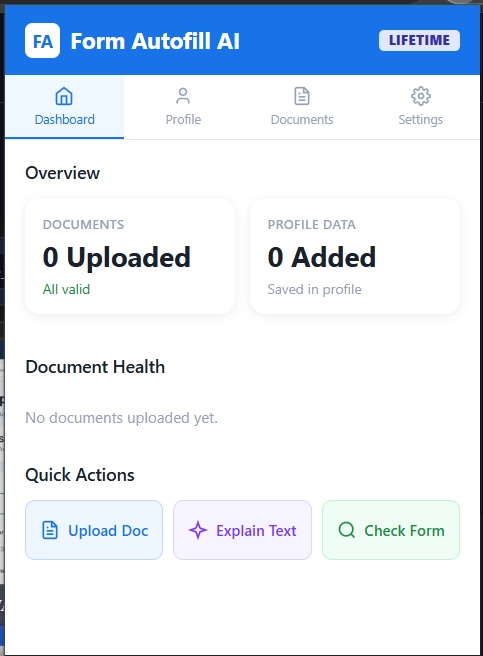
Interactive Extension Dashboard
Check your overall profile completion, track document health checklist, and quickly perform common actions from a unified view.
🚀 Fully Optimized for 60+ Portals
Form Autofill AI is customized with special field templates, validation schemas, and guidelines for all major platforms.
🔒 Strict Local Privacy Commitment
We understand that your identity numbers (Aadhaar, PAN) and banking details are highly confidential. That is why Form Autofill AI operates with a zero-server tracking architecture. All user information and loaded documents remain strictly in your browser\'s local database. Your credentials never travel across the web.
📜 Terms of Service & Local Agreement
By using Form Autofill AI, you agree to store your application metadata and files locally on your own device. We grant you a free, non-exclusive license to use the extension. You remain solely responsible for the correctness of the forms you submit.
Frequently Asked Questions
Form AutoFill AI is a secure, local-first auto form filler Chrome extension that automatically fills online forms using secure saved user profiles and resume data. Available on the Chrome Web Store, it bypasses tedious data entry.
The extension uses intelligent data mapping to perform automatic form filling. It scans web page labels and structures, securely mapping your identity profiles and resume keywords to input fields in real time.
Yes, you can try all premium Pro features, including advanced document parsing and pre-submission scanning, completely free for 30 days. No credit card is required to activate the trial.
No account is required to use the basic features of the extension. You can store up to 22 standard identity fields locally in your browser completely anonymously.
Form AutoFill AI is fully compatible with Google Chrome, Microsoft Edge, Brave, Opera, Vivaldi, and other Chromium-based browsers.
Simply log in to your account dashboard on our landing page, select either the Pro Yearly or Lifetime access option, and complete the secure payment using our Razorpay integration.
You can cancel your subscription at any time directly through your account billing panel or by dropping an email to our support team at formsathi21@gmail.com. Your Pro access remains active until the end of your billing cycle.
Chrome extensions are currently only supported on desktop browsers. However, you can access your account dashboard on mobile browsers to manage subscriptions.